Building a Slack agent with AWS
Introduction
Slack agents are massively powerful. A well-made Slack agent can be used by a company to automate a lot of toil and tiring work.
You might ask why a Slack agent is uniquely powerful compared to, say, Claude Desktop. It's because Slack is already a multiplayer experience where the context of multiple people can coalesce in a natural setting. Often the deciding factor of if an agent will work well is if it has access to the correct context, and the most valuable context is usually in someone's head rather than accessible by an MCP tool.
Slack agents also offer the unique opportunity to capture institutional knowledge and encode it somewhere durable for use by other agents, for instance turning a debugging thread into a runbook or updating documentation via an MCP tool once a question is answered.
I've spent a few weekends now learning everything I can about building Slack agents on AWS, especially on AWS AgentCore Harness. AgentCore Harness is a good primitive for Slack agents since it abstracts away the agentic loop into infrastructure configuration, and comes with managed memory.
I had some basic requirements for my Slack agent:
- Can be activated via mentions.
- It can respond using Slack's rich markup language (called "blocks").
- Sandboxed.
- Remembers context within a thread (with easy support for long-term user preferences).
- Additional MCP tools can be easily added.
To keep it simple I'm building the whole thing in Lambda, so the maximum time a single agent turn can take is 15 minutes. I think in many cases this won't be an issue, but if it is you can use a durable Lambda function which has much longer execution time limits.
Our architecture is actually pretty simple; an API Gateway for Slack to POST to, a Lambda to coordinate the agent, and an AWS-managed AgentCore Harness.
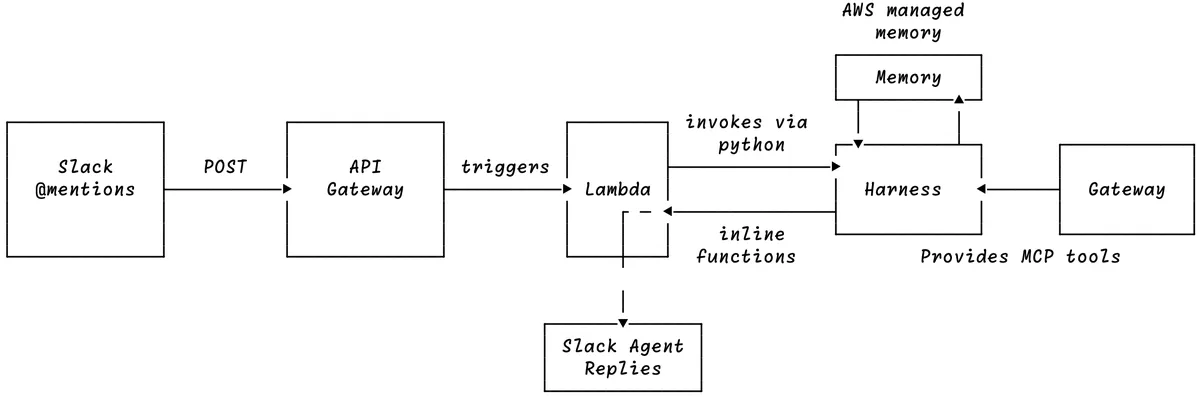
We'll be using Terraform and Python to build our Slack agent; Terraform makes it trivial to define our infrastructure. You can find the full code for this post on GitHub.
Before doing anything fancy though, you should set up your Slack app using this guide. Make sure to turn socket mode off when you set up the app's event subscriptions, and enable the app_mentions:read, chat:write, and reactions:write Bot Token Scopes. We'll stick with the default app_mention event since it's the most simple, but adding others is quite trivial. You can use the Slack event reference to see the payloads of other events so you can add them as triggers to your Slack agent.
API Gateway + Lambda
First, let's set up our Terraform providers in terraform.tf. Note that aws_bedrockagentcore_harness requires version 6.46.0 or newer of the AWS provider:
terraform {
  required_providers {
    aws = {
      source  = "hashicorp/aws"
      version = ">= 6.46.0"
    }
    archive = {
      source = "hashicorp/archive"
    }
  }

  required_version = "~> 1.6"
}
You need a URL that Slack can send its events to, in fact you need to set this up in order to enable event subscriptions on your Slack app.
After setting up your Slack app you'll need to put your bot token and signing secret somewhere so our Lambda function can talk to Slack, so we'll make a secret to store them.
resource "aws_secretsmanager_secret" "secret" {
  name = "slack-agent/bot-token-slack"
}
This will be useful once we set up our Lambda. Let's do this now.
data "aws_caller_identity" "current" {}

data "aws_region" "current" {}

locals {
  function_name = "slack-agent-worker"
  function_arn  = "arn:aws:lambda:${data.aws_region.current.region}:${data.aws_caller_identity.current.account_id}:function:${local.function_name}"
}

# We will put our lambdas application code into a `build` folder.
# We haven't written any of this yet...but we will!
data "archive_file" "lambda" {
  type        = "zip"
  source_dir  = "${path.module}/build/package"
  output_path = "${path.module}/build/handler.zip"
}

resource "aws_iam_role" "lambda" {
  name = "slack-agent-lambda-role"

  assume_role_policy = jsonencode({
    Version = "2012-10-17"
    Statement = [{
      Effect    = "Allow"
      Principal = { Service = "lambda.amazonaws.com" }
      Action    = "sts:AssumeRole"
    }]
  })
}

resource "aws_iam_role_policy_attachment" "logs" {
  role       = aws_iam_role.lambda.name
  policy_arn = "arn:aws:iam::aws:policy/service-role/AWSLambdaBasicExecutionRole"
}

# This is used by Slack's Bolt library to
# quickly ack back to Slack before self-invoking
# in order to run functions which take longer
# than 3 seconds to run.
resource "aws_iam_role_policy" "self_invoke" {
  role = aws_iam_role.lambda.id

  policy = jsonencode({
    Version = "2012-10-17"
    Statement = [{
      Effect   = "Allow"
      Action   = "lambda:InvokeFunction"
      Resource = [local.function_arn, "${local.function_arn}:*"]
    }]
  })
}

resource "aws_lambda_function" "lambda" {
  function_name    = local.function_name
  role             = aws_iam_role.lambda.arn
  runtime          = "python3.12"
  handler          = "handler.handler"
  filename         = data.archive_file.lambda.output_path
  source_code_hash = data.archive_file.lambda.output_base64sha256

  environment {
    variables = {
      SECRETS_ARN = aws_secretsmanager_secret.secret.arn
    }
  }

  depends_on = [aws_iam_role_policy.self_invoke]
  timeout    = 120 # 2 minute timeout, we won't need more for our prototype.
}

resource "aws_lambda_permission" "apigw_invoke" {
  statement_id  = "AllowAPIGatewayInvoke"
  action        = "lambda:InvokeFunction"
  function_name = aws_lambda_function.lambda.function_name
  principal     = "apigateway.amazonaws.com"
  source_arn    = "${aws_apigatewayv2_api.example.execution_arn}/*/*" # any stage, any route of our API Gateway can trigger our lambda.
}

data "aws_iam_policy_document" "lambda_read_secret" {
  # Let our lambda read our secret
  statement {
    effect = "Allow"

    actions = [
      "secretsmanager:GetSecretValue"
    ]

    resources = [
      aws_secretsmanager_secret.secret.arn
    ]
  }
}

resource "aws_iam_role_policy" "lambda_read_secret" {
  name   = "read-slack-agent-tokens"
  role   = aws_iam_role.lambda.id
  policy = data.aws_iam_policy_document.lambda_read_secret.json
}
We'll create an API Gateway with a route for Slack to send events to:
# api_gateway.tf

resource "aws_apigatewayv2_api" "example" {
  name          = "example-http-api"
  protocol_type = "HTTP"
}

resource "aws_apigatewayv2_stage" "default" {
  api_id      = aws_apigatewayv2_api.example.id
  name        = "$default"
  auto_deploy = true
}

resource "aws_apigatewayv2_integration" "lambda" {
  api_id                 = aws_apigatewayv2_api.example.id
  integration_type       = "AWS_PROXY"
  # this is what allows an endpoint to trigger a lambda.
  integration_uri        = aws_lambda_function.lambda.invoke_arn
  payload_format_version = "2.0"
}

resource "aws_apigatewayv2_route" "lambda" {
  api_id    = aws_apigatewayv2_api.example.id
  route_key = "POST /slack-event" # or "$default" as a catch-all
  target    = "integrations/${aws_apigatewayv2_integration.lambda.id}"
}

# We output the url so after we apply the terraform we know
# what url to give to Slack for event subscriptions.
output "url" {
  value = "${aws_apigatewayv2_stage.default.invoke_url}slack-event"
}
What the above does is create an API Gateway with a route which triggers a Lambda when it gets a POST request. Now let's write the Lambda code.
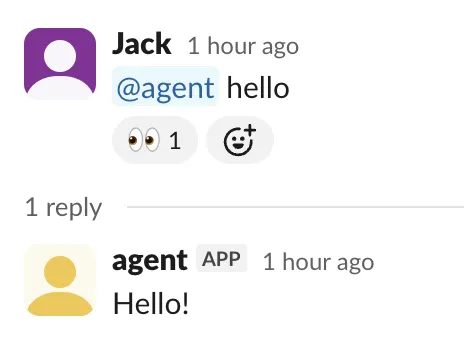
Before doing anything fancy, let's just write some boilerplate in handler.py which responds with 👀 and then says hello in the thread of the mention.
import json
import os

import boto3
from slack_bolt import App, BoltContext
from slack_bolt.adapter.aws_lambda import SlackRequestHandler

# Grab our secret from secretsmanager.
secrets = json.loads(
    boto3.client("secretsmanager").get_secret_value(SecretId=os.environ["SECRETS_ARN"])[
        "SecretString"
    ]
)

app = App(
    # process before response MUST be used for lambdas.
    # basically, bolt assumes you are on a proper server
    # so if you don't set this it sends a 200 back to Slack
    # and exits, but this forces it to run your functions first.
    process_before_response=True,
    token=secrets["SLACK_BOT_TOKEN"],
    signing_secret=secrets["SLACK_SIGNING_SECRET"],
)


def acknowledge(ack, event, client, context: BoltContext):
    ack()  # first, to stay inside Slack's 3-second window
    if event.get("bot_id") or event.get("subtype"):
        return
    if not event.get("thread_ts"):
        client.reactions_add(
            channel=context.channel_id, timestamp=event["ts"], name="eyes"
        )


def say_hi(event, say):
    # Get the "thread_ts", this is how Slack IDs threads in a channel.
    thread_ts = event.get("thread_ts") or event["ts"]
    say("Hello!", thread_ts=thread_ts)


# You may have noticed the self invoke IAM permissions
# from earlier, that was because bolt will invoke this
# lambda with a special payload which will run the
# "lazy" functions after running the ack function
# in this lambda.
app.event("app_mention")(ack=acknowledge, lazy=[say_hi])


def handler(event, context):
    return SlackRequestHandler(app=app).handle(event, context)
The Slack Bolt library does something quite clever to respond within 3 seconds (which causes the Lambda to exit, since it's part of the HTTP response) while allowing for long-running functions - it self-invokes the Lambda with a special event payload that tells Bolt in the follow-up invoke to begin running the lazy functions. We will use this for the agent response later.
Before we apply the Terraform, we need to package handler.py along with slack_bolt into the build/package directory that our archive_file block zips up:
mkdir -p build/package
uv pip install slack_bolt --target build/package \
  --python 3.12 \
  --python-platform x86_64-manylinux_2_17 \
  --only-binary=:all:
cp handler.py build/package/
Now you can run terraform apply. Make sure to go into AWS after applying and add the Slack app secrets as SLACK_BOT_TOKEN and SLACK_SIGNING_SECRET. Do this before pasting the URL into Slack, since our Lambda reads this secret on startup and Slack's URL verification check will fail if the secret is still empty.
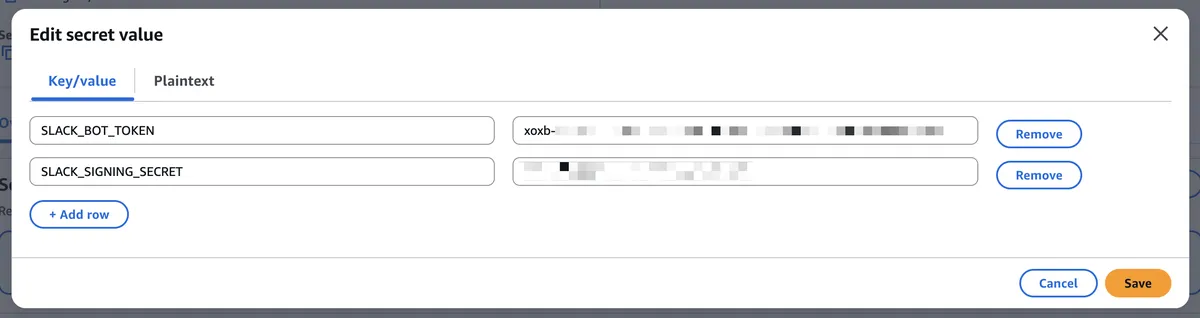
Also take note of the URL Terraform outputs — this is what you'll put into the Slack app console for Event Subscriptions.


After setting this up, you'll be able to @ your app in Slack and get a very basic response.
AgentCore Harness + Gateway
Now, we want something more interactive than a baked-in Hello!. Ideally we want an agent we can connect to MCPs and do some real work with. This is where AgentCore Harness comes in.
AgentCore Harness is basically a totally managed agent provided by AWS. For more advanced use-cases you should probably hand-roll a custom agent using AgentCore Runtime, but for exposing a fully managed agent to Slack, AgentCore Harness is the way.
locals {
  model_id = "minimax.minimax-m2.5"
}

data "aws_iam_policy_document" "assume_role" {
  statement {
    effect  = "Allow"
    actions = ["sts:AssumeRole"]
    principals {
      type        = "Service"
      identifiers = ["bedrock-agentcore.amazonaws.com"]
    }
  }
}

resource "aws_iam_role" "harness" {
  name               = "bedrock-agentcore-harness-role"
  assume_role_policy = data.aws_iam_policy_document.assume_role.json
}

resource "aws_iam_role_policy" "harness" {
  role = aws_iam_role.harness.name

  policy = jsonencode({
    Version = "2012-10-17"
    Statement = [
      {
        Sid      = "InvokeModel"
        Effect   = "Allow"
        Action   = ["bedrock:InvokeModel", "bedrock:InvokeModelWithResponseStream"]
        Resource = "*"
      },
      {
        Sid    = "AgentCoreMemory"
        Effect = "Allow"
        Action = [
          "bedrock-agentcore:CreateEvent",
          "bedrock-agentcore:GetEvent",
          "bedrock-agentcore:ListEvents",
          "bedrock-agentcore:DeleteEvent",
          "bedrock-agentcore:ListSessions",
          "bedrock-agentcore:ListActors",
          "bedrock-agentcore:GetMemory",
          "bedrock-agentcore:GetMemoryRecord",
          "bedrock-agentcore:ListMemoryRecords",
          "bedrock-agentcore:RetrieveMemoryRecords",
        ]
        Resource = "arn:aws:bedrock-agentcore:${data.aws_region.current.region}:${data.aws_caller_identity.current.account_id}:memory/*"
      },
    ]
  })
}

resource "aws_bedrockagentcore_harness" "harness" {
  harness_name       = "slack_harness"
  execution_role_arn = aws_iam_role.harness.arn

  model {
    bedrock_model_config {
      model_id = local.model_id
    }
  }

  allowed_tools = ["*"]

  system_prompt {
    text = "You are a helpful Slack assistant. Always use the post_to_slack tool to reply to the user using Slack Block Kit."
  }
}
Above is mostly IAM boilerplate which allows the Harness service to use the other required AgentCore services, plus we pick a model (Minimax 2) and tell it in the system prompt to always reply using our post_to_slack tool.
You might also notice the AgentCoreMemory permissions in the IAM policy even though we didn't define a memory resource in Terraform. That's because Harness provisions and manages its own AgentCore Memory automagically out of the box, giving us conversation history and long-term memory without having to manage any state ourselves.
Now, we need to edit the Lambda Terraform so it can call the harness.
resource "aws_lambda_function" "lambda" {
  # ...
  environment {
    variables = {
      SECRETS_ARN = aws_secretsmanager_secret.secret.arn
      HARNESS_ARN = aws_bedrockagentcore_harness.harness.arn
    }
  }
  # ...
}

data "aws_iam_policy_document" "lambda_invoke_harness" {
  statement {
    sid    = "InvokeHarness"
    effect = "Allow"
    actions = [
      "bedrock-agentcore:InvokeHarness",
      "bedrock-agentcore:InvokeAgentRuntime",
    ]
    resources = [aws_bedrockagentcore_harness.harness.arn]
  }
}

resource "aws_iam_role_policy" "lambda_invoke_harness" {
  name   = "invoke-slack-agent-harness"
  role   = aws_iam_role.lambda.id
  policy = data.aws_iam_policy_document.lambda_invoke_harness.json
}
Now, we are going to use something a bit fancy in our Lambda called inline functions. Basically, we can pass a tool to the harness which actually doesn't exist on the server, and instead pauses execution in the harness so we can run some code in the Lambda.
You might wonder why we use an inline tool for posting to Slack when we could just take the model's final text output and pass it to say(). Making post_to_slack a tool gives us a few nice things for free: the tool's inputSchema forces the model to hand us structured Slack Block Kit JSON (blocks + plain-text text) instead of hoping it formats raw text properly, the agent can send multiple messages mid-turn while it's still working through other tool calls, and because our Lambda handles the actual say() call, responses are guaranteed to stay locked to the right thread without needing a dedicated Slack MCP server.
The following code is straight from AWS's documentation on using inline functions, but it essentially reads the response object and looks for if the model has tried to call our inline function, since it could have also just ended it's turn without using our tool. If the harness has used our tool, then we just pass the arguments to our function and then send the results back to the harness. AWS automatically glues it on the conversation and the harness continues as if nothing has happened. See the AWS AgentCore Harness tool documentation for more details..
import json
import os

import boto3
from slack_bolt import App, BoltContext
from slack_bolt.adapter.aws_lambda import SlackRequestHandler

# We passed this in the Terraform.
HARNESS_ARN = os.environ["HARNESS_ARN"]

# Grab our secret from secretsmanager.
secrets = json.loads(
    boto3.client("secretsmanager").get_secret_value(SecretId=os.environ["SECRETS_ARN"])[
        "SecretString"
    ]
)

app = App(
    # process before response MUST be used for lambdas.
    # basically, bolt assumes you are on a proper server
    # so if you don't set this it sends a 200 back to Slack
    # and exits, but this forces it to run your functions first.
    process_before_response=True,
    token=secrets["SLACK_BOT_TOKEN"],
    signing_secret=secrets["SLACK_SIGNING_SECRET"],
)

agentcore = boto3.client("bedrock-agentcore")

# This is the definition of our post to slack tool.
tools = [{
    "type": "inline_function",
    "name": "post_to_slack",
    "config": {"inlineFunction": {
        "description": (
            "Post a message to the current Slack thread using Block Kit. "
            "Use this for every reply to the user. Provide a Block Kit `blocks` "
            "array and a plain-text `text` fallback for notifications."
        ),
        "inputSchema": {
            "type": "object",
            "properties": {
                "text": {"type": "string"},
                "blocks": {"type": "array", "items": {"type": "object"}},
            },
            "required": ["text", "blocks"],
        },
    }},
}]

allowed_tools = ["@post_to_slack"]


# this is the "quick" function which will be used to ack Slack (and add a reaction).
def acknowledge(ack, event, client, context: BoltContext):
    ack()  # first, to stay inside Slack's 3-second window
    if event.get("bot_id") or event.get("subtype"):
        return
    if not event.get("thread_ts"):
        client.reactions_add(
            channel=context.channel_id, timestamp=event["ts"], name="eyes"
        )


# This is the real meat of the lambda, we invoke the Harness with the slack message and use the inline function to respond in the thread.
def agent_reply(event, say, context: BoltContext):
    if event.get("bot_id") or event.get("subtype"):
        return

    # Get the "thread_ts", this is how Slack IDs threads in a channel.
    thread_ts = event.get("thread_ts") or event["ts"]
    # One session per thread. Must match [a-zA-Z0-9][a-zA-Z0-9-_]*, min length 33.
    session_id = f"slack-{context.channel_id}-{thread_ts.replace('.', '-')}".ljust(33, "0")

    messages = [{"role": "user", "content": [{"text": event["text"]}]}]

    while True:
        # 1. Invoke with the inline function tool
        response = agentcore.invoke_harness(
            harnessArn=HARNESS_ARN,
            runtimeSessionId=session_id,
            tools=tools,
            allowedTools=allowed_tools,
            messages=messages,
        )

        # 2. Capture the toolUseId and input, then wait for the handoff boundary
        tool_use_id = None
        tool_block_index = None
        tool_input = None
        last_stop_reason = None

        for stream_event in response["stream"]:
            if "contentBlockStart" in stream_event:
                content_block_start = stream_event["contentBlockStart"]
                start = content_block_start.get("start", {})
                if (
                    tool_use_id is None
                    and "toolUse" in start
                    and start["toolUse"].get("name") == "post_to_slack"
                ):
                    tool_use_id = start["toolUse"]["toolUseId"]
                    tool_block_index = content_block_start["contentBlockIndex"]
            if "contentBlockDelta" in stream_event:
                content_block_delta = stream_event["contentBlockDelta"]
                delta = content_block_delta.get("delta", {})
                if (
                    content_block_delta.get("contentBlockIndex") == tool_block_index
                    and "toolUse" in delta
                ):
                    tool_input = (tool_input or "") + delta["toolUse"].get("input", "")
            if "messageStop" in stream_event:
                last_stop_reason = stream_event["messageStop"].get("stopReason")

        if last_stop_reason != "tool_use" or tool_use_id is None:
            return

        # 3. Execute the tool yourself and send the matching result back
        tool_arguments = json.loads(tool_input or "{}")
        say(
            text=tool_arguments["text"],
            blocks=tool_arguments["blocks"],
            thread_ts=thread_ts,
        )
        messages = [{
            "role": "user",
            "content": [{
                "toolResult": {
                    "toolUseId": tool_use_id,
                    "content": [{"text": "Message posted."}],
                    "status": "success",
                }
            }],
        }]


app.event("app_mention")(ack=acknowledge, lazy=[agent_reply])


def handler(event, context):
    return SlackRequestHandler(app=app).handle(event, context)
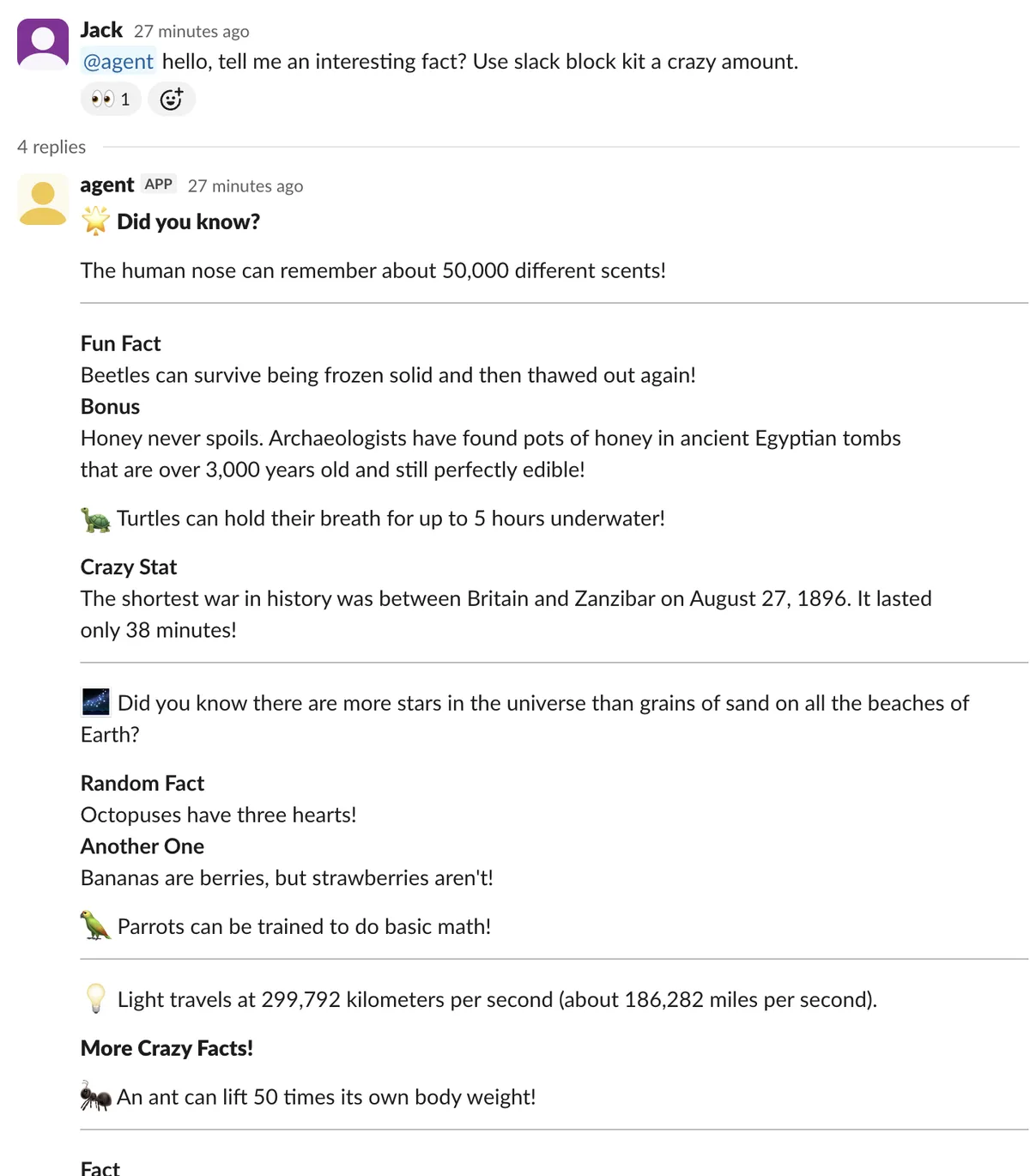
After re-packaging handler.py and applying this, you'll have an agent which can respond over Slack!
The final piece of the puzzle is adding a simple MCP server using AgentCore Gateway. Gateway supports many ways of adding tools (for instance, it can wrap Lambdas as tools), but we'll just use it to expose a free MCP server to the harness.
We'll be adding a weather MCP server to the harness, so we can ask about the weather from Slack (you could also look out the window).
# gateway.tf

data "aws_iam_policy_document" "gw_assume" {
  statement {
    actions = ["sts:AssumeRole"]
    principals {
      type        = "Service"
      identifiers = ["bedrock-agentcore.amazonaws.com"]
    }
  }
}

resource "aws_iam_role" "gateway" {
  name               = "agentcore-gateway"
  assume_role_policy = data.aws_iam_policy_document.gw_assume.json
}

# We have to let the harness call the gateway.
data "aws_iam_policy_document" "harness_invoke" {
  statement {
    actions   = ["bedrock-agentcore:InvokeGateway"]
    resources = [aws_bedrockagentcore_gateway.main.gateway_arn]
  }
}

resource "aws_iam_role_policy" "harness_invoke" {
  role   = aws_iam_role.harness.id
  policy = data.aws_iam_policy_document.harness_invoke.json
}

# Define a single "gateway". You can actually attach
# multiple MCP servers + tools to a single gateway.
# We'll use IAM auth since it's all going to be
# accessed within AWS servers.
resource "aws_bedrockagentcore_gateway" "main" {
  name            = "tools-gateway"
  role_arn        = aws_iam_role.gateway.arn
  authorizer_type = "AWS_IAM"
  protocol_type   = "MCP"
}

# Here we basically use the gateway as a proxy to an existing
# remote MCP server.
resource "aws_bedrockagentcore_gateway_target" "echorune" {
  name               = "echorune"
  gateway_identifier = aws_bedrockagentcore_gateway.main.gateway_id

  target_configuration {
    mcp {
      mcp_server {
        endpoint = "https://echorune.net/mcp"
      }
    }
  }
}
Now just make some edits to the harness Terraform to expose the gateway:
# harness.tf
resource "aws_bedrockagentcore_harness" "harness" {
  harness_name       = "slack_harness"
  execution_role_arn = aws_iam_role.harness.arn

  model {
    bedrock_model_config {
      model_id = local.model_id
    }
  }

  allowed_tools = ["*"]

  tool {
    type = "agentcore_gateway"
    config {
      agentcore_gateway {
        gateway_arn = aws_bedrockagentcore_gateway.main.gateway_arn
        outbound_auth {
          aws_iam = true
        }
      }
    }
  }

  system_prompt {
    text = "You are a helpful Slack assistant. Always use the post_to_slack tool to reply to the user using Slack Block Kit."
  }
}
We also need to pass GATEWAY_ARN to the Lambda in lambda.tf:
# lambda.tf
resource "aws_lambda_function" "lambda" {
  # ...
  environment {
    variables = {
      SECRETS_ARN = aws_secretsmanager_secret.secret.arn
      HARNESS_ARN = aws_bedrockagentcore_harness.harness.arn
      GATEWAY_ARN = aws_bedrockagentcore_gateway.main.gateway_arn
    }
  }
  # ...
}
And finally, update handler.py to include the gateway in tools and allowed_tools:
GATEWAY_ARN = os.environ["GATEWAY_ARN"]

tools = [
    {
        "type": "agentcore_gateway",
        "name": "gateway_tools",
        "config": {"agentCoreGateway": {"gatewayArn": GATEWAY_ARN}},
    },
    {
        "type": "inline_function",
        "name": "post_to_slack",
        "config": {"inlineFunction": {
            "description": (
                "Post a message to the current Slack thread using Block Kit. "
                "Use this for every reply to the user. Provide a Block Kit `blocks` "
                "array and a plain-text `text` fallback for notifications."
            ),
            "inputSchema": {
                "type": "object",
                "properties": {
                    "text": {"type": "string"},
                    "blocks": {"type": "array", "items": {"type": "object"}},
                },
                "required": ["text", "blocks"],
            },
        }},
    },
]

# "@name" matches a server (the gateway) or an inline function
allowed_tools = ["@gateway_tools", "@post_to_slack"]
And that's it! We now have a Slack agent with an MCP tool.
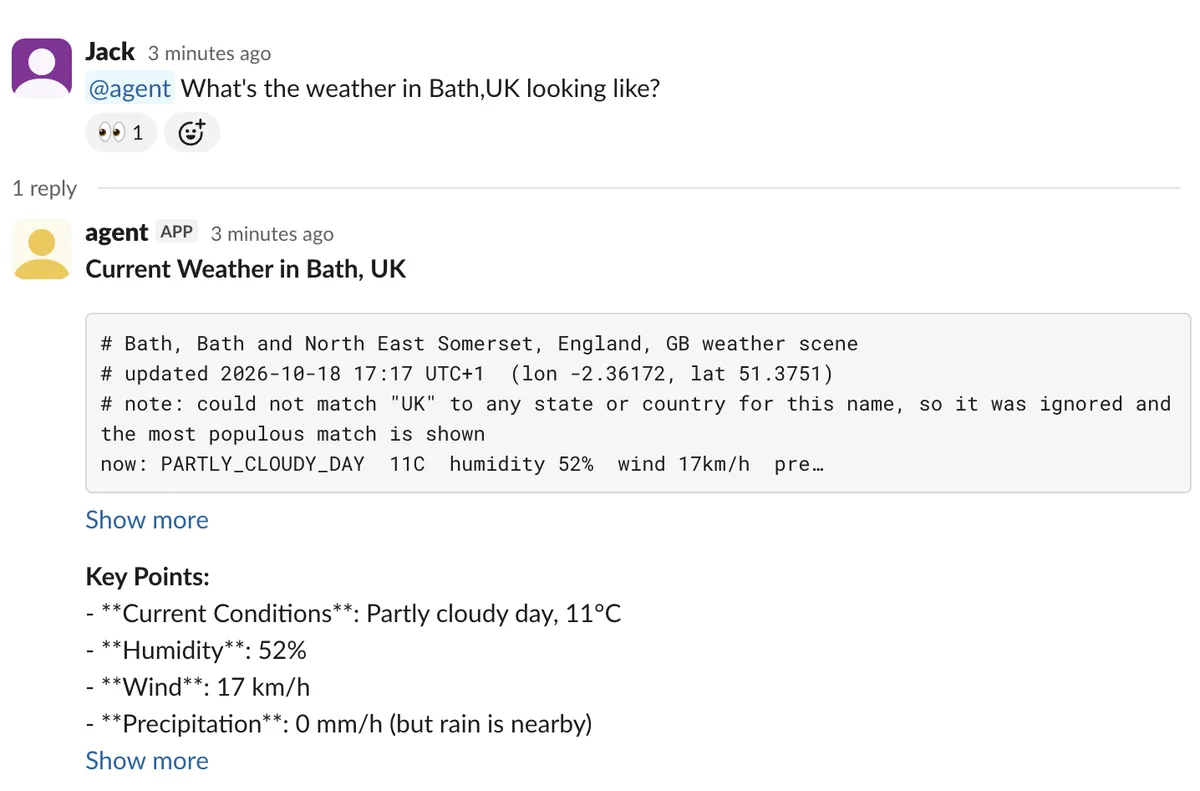
From this basic skeleton you can get quite far; AgentCore Harness allows for quite a bit of functionality. For instance, by passing the user's Slack ID as the actor ID in invoke_harness you get user-scoped memory for free.
You can also @ the agent in the Slack thread and the exact same agent session is reused to answer the follow-up, meaning full tool calls and context are continued. This is quite useful if you anticipate users will need to ask follow-up questions to the agent.
All of the code from this post is available on GitHub.