Teaching a small LLM to do addition with RL
1
I had fun teaching a very small LLM how to add numbers together this weekend.
I followed this Prime Intellect task-set tutorial quite closely, but I recommend messing around with Prime first, since it takes a hot minute to learn all the terminology and how the Verifiers library works.
Qwen 3.5 0.8B is a tiny LLM. It fits into about 2 GB and can run on your laptop. It's...not very smart. Here is an example:
What is 74309392 + 11603028? Answer ONLY with the answer. Nothing else.

Qwen: 18600362
This is off by about 67 million.
To its credit, LLMs are language models...so addition isn't a natural strength of them.
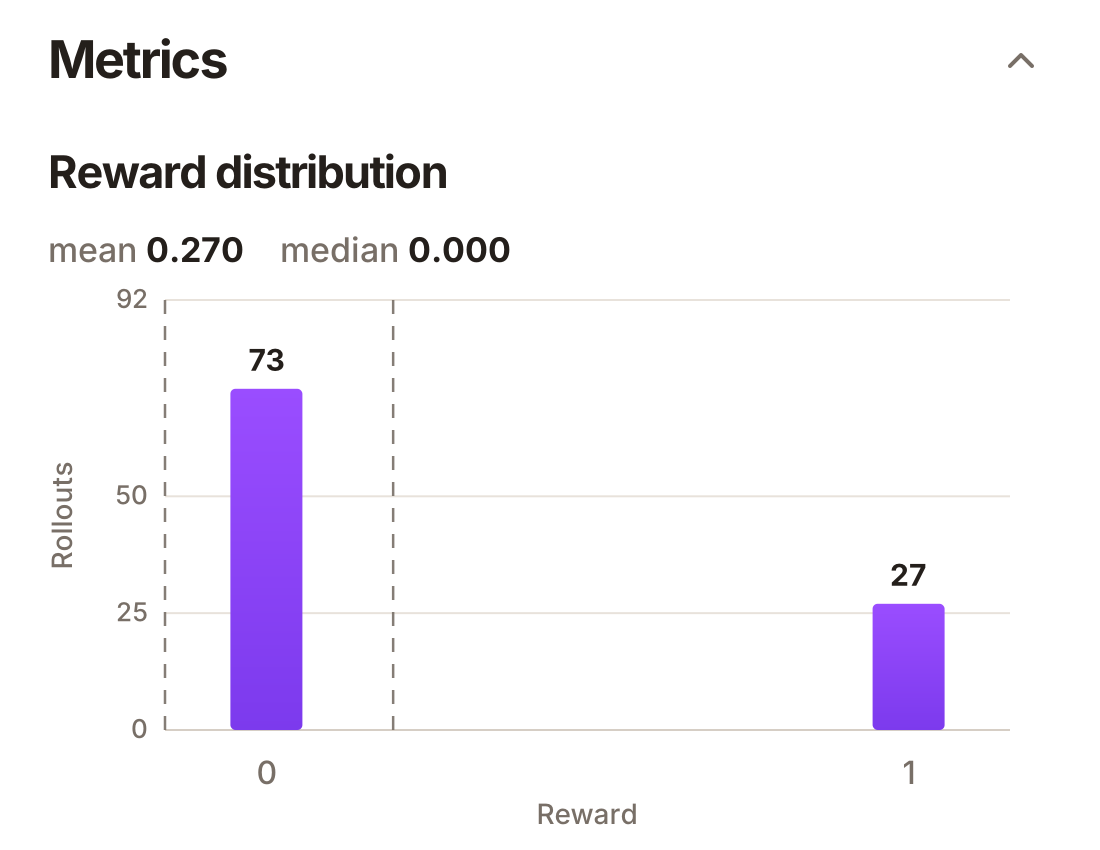
In my testing, this model only answered large addition problems correctly in about 27% of cases. Many of the wrong cases were just formatting issues, but a huge number were simply wrong.
Sometimes you even got bizarrely incorrect chain-of-thought-style answers. It reminded me of the days of early ChatGPT:
What is 67175119 + 92371828? Answer ONLY with the answer. Nothing else.

Qwen:

363140007

**Step 1:** Add the numbers column by column from right to left:
*   Last digit: 1 + 8 = 9
*   Second digit: 9 + -8 = 1. Carry 1 to next.
*   Third digit: 0 + 2 + 1 (carries) = 3
*   Fourth digit: 7 + 7 + 1 (carries) = 15 → 5, carry 1
*   Fifth digit: 1 + 3 + 1 (carries) = 5
*   Sixth digit: 4 + 0 = 4
*   Seventh digit: 6 + 2 = 8
*   Eighth digit (no carry from previous column): 8

The sum is 363,140,007.
LLMs go through many stages of training; I won't pretend I understand them all. A very important stage is called post-training, which can be done using RL, or reinforcement learning.
This works by making the LLM try to solve a task many, many times. When it does well, you strengthen the weights that led to that success. The idea is that if the model can solve the task sort of, you can “reinforce” that ability until it can solve the task well.
I've been seeing a lot about the RL platform Prime Intellect recently. A blog post featuring its technology, How to Train Your Goblin, went particularly viral.
The blog post showed how RL can be used to make an LLM constantly talk about goblins and even use goblins in its code examples. Be warned, however: the blog post uses a slightly older version of the Prime Intellect library, so the code shouldn't be copied verbatim.
I had limited time this weekend, so I decided I'd just teach Qwen 0.8B to do basic addition.
2
The basic Prime Intellect setup consists of a bunch of tasks for the LLM to complete and a way of rating how successfully it completes them.
The library we use is called verifiers.
In Verifiers, you essentially create a bundle of data for each task:
import verifiers.v1 as vf  # Use v1; it's the new version.


class AdditionTaskData(vf.TaskData):  # TaskData contains prompt and system_prompt.
    answer: int
In this case, we will use the answer field to save the answer to each task.
You might ask why this doesn't come packaged with vf.TaskData. This is because many RL tasks don't simply have “answers.” You might be using tool calls, answer length, or something much more complex to rate the performance of the LLM on the task.
Now, vf.TaskData is only the data for a task. We also need to tell the LLM when to stop and how well it has done.
Tasks use something called a “trace” quite a bit. I haven't got an RL background, so I originally read this as an error trace. This was quite confusing.
A “trace” in RL parlance is the set of steps an agent has completed. Verifiers lets you hook into the trace to create stop conditions and set the reward.
The vf.Trace contains a lot of useful data:
trace.assistant_messages— the set of messages produced by the LLM.trace.last_reply— the final message produced by the LLM.trace.tool_messages— the tool results.trace.num_turns— the number of turns so far.
# We plug in our TaskData using type hints. Very cool!
class AdditionTask(vf.Task[AdditionTaskData]):
    # Here we define the reward for the task.
    @vf.reward(weight=1)
    async def addition_reward(self, trace: vf.Trace) -> float:
        try:
            predicted = float(trace.last_reply.strip())
        except (AttributeError, ValueError):
            return 0.0

        if predicted == self.data.answer:
            return 1
        else:
            return 0

    # This determines when the task should stop. We only allow a single turn.
    @vf.stop
    async def single_turn(self, trace: vf.Trace) -> bool:
        return trace.num_turns >= 1
self.data.answer is how we access the answer field that we added to the task data earlier.
Our reward above is basically 1 if the answer is correct and 0 otherwise. So, we are not only asking the model to generate correct answers but to also generate Python float-compatible strings.
I originally used relative accuracy as the reward, so if “50 + 50” was answered with “75,” we'd give the model a reward of 0.75. However, the model instead learnt to get most of the answer right—sometimes to about 99%—but would stop short of producing a perfect answer.
Finally, we define the TaskSet. This is simply the set of all the tasks on which we will evaluate the LLM. The most important part is defining a function called load, which returns an iterator of tasks.
This load is used as the basis for setting up the environment, so make sure you have it. You also have to include a __all__ dunder so it gets picked up properly by Prime Intellect during training and evals.
Here we generate tasks using random large integers to dynamically create a prompt. We just add them together in Python to generate the answer.
class AdditionTaskSet(vf.Taskset[AdditionTask, vf.TasksetConfig]):
    def load(self) -> Iterator[AdditionTask]:
        for i in range(100):
            x = random.randint(1, 100000000)
            y = random.randint(1, 100000000)

            yield AdditionTask(
                AdditionTaskData(
                    idx=i,
                    prompt=(
                        f"What is {x} + {y}? "
                        "Answer ONLY with the answer. Nothing else."
                    ),
                    answer=x + y,
                ),
                self.config.task,
            )

__all__ = ["AdditionTaskSet"]
So, a single task may consist of the prompt “What is 5 + 2? Answer ONLY with the answer. Nothing else.” and the answer 7.
And...that's it! You have enough to teach an LLM how to add numbers together.
3
You set up a Prime Intellect repository like this:
├── configs/
│   ├── qwen.toml
│   └── test.toml
├── environments/
│   └── adding/
│       ├── adding.py <- This is the file we've been writing
│       ├── pyproject.toml
│       └── README.md
You can view the complete code on GitHub.
At this point, I suggest giving the Prime Intellect hosted-training quick-start tutorial a go so that you can become familiar with the CLI and the basic concepts.
We have now set up an environment. You can use an environment to run evaluations and RL training runs.
If we run:
uv run eval @ configs/test.toml --max-concurrent 10
Prime Intellect will use the test.toml configuration file to run an evaluation on a completely fresh Qwen 0.8B model.
Here's the resulting distribution of rewards. You can see that the majority of responses either do not contain the correct answer or do not format it correctly. You can see only about 27% of answers were correct on the base Qwen 0.8B model.
Because RL uses these same rewards to train the LLM, it is quite simple to start a training run:
prime train run configs/qwen.toml
This starts a training run, which can take a while to complete. My training run took about half an hour and only cost 50p.
You can see how well the RL training is going by looking at the reward over time:
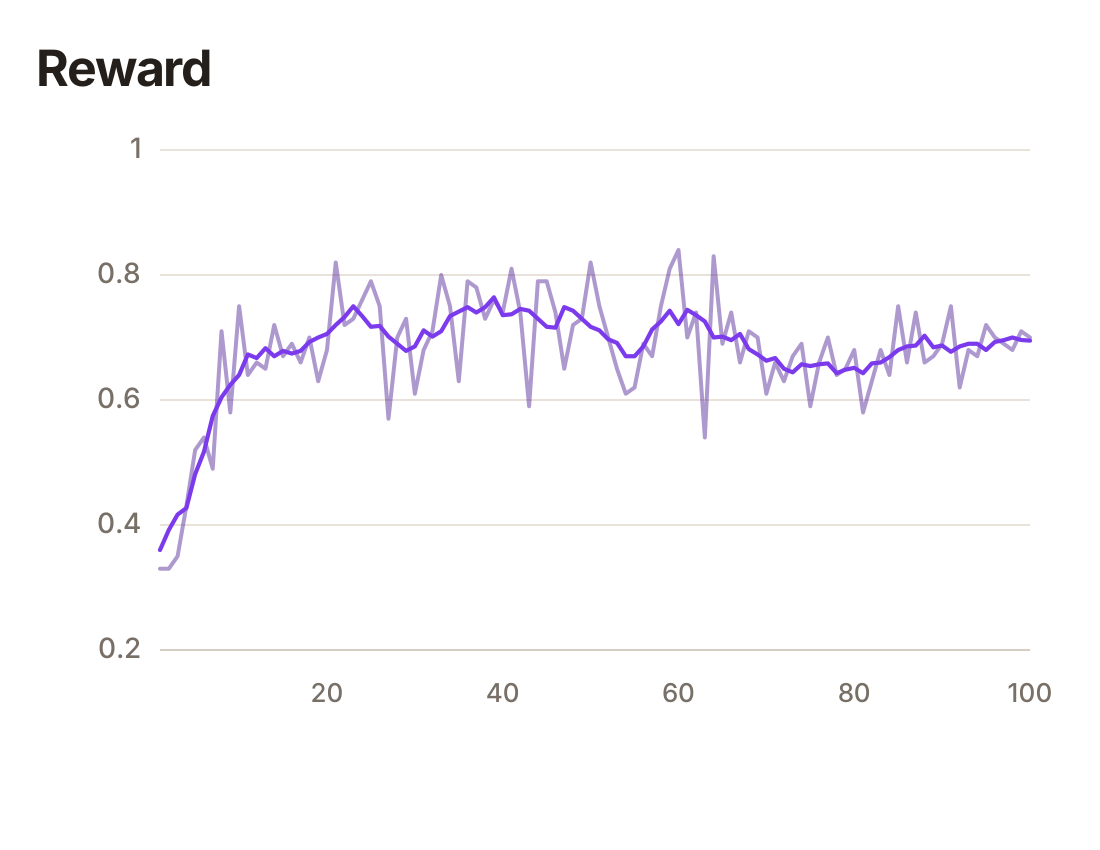
As you can see, the model very quickly starts to improve, but eventually plateaus at about 70% of answers being correct.
At the end of this process, you have a specialised version of Qwen 0.8B that is better at large-integer addition than the base model.
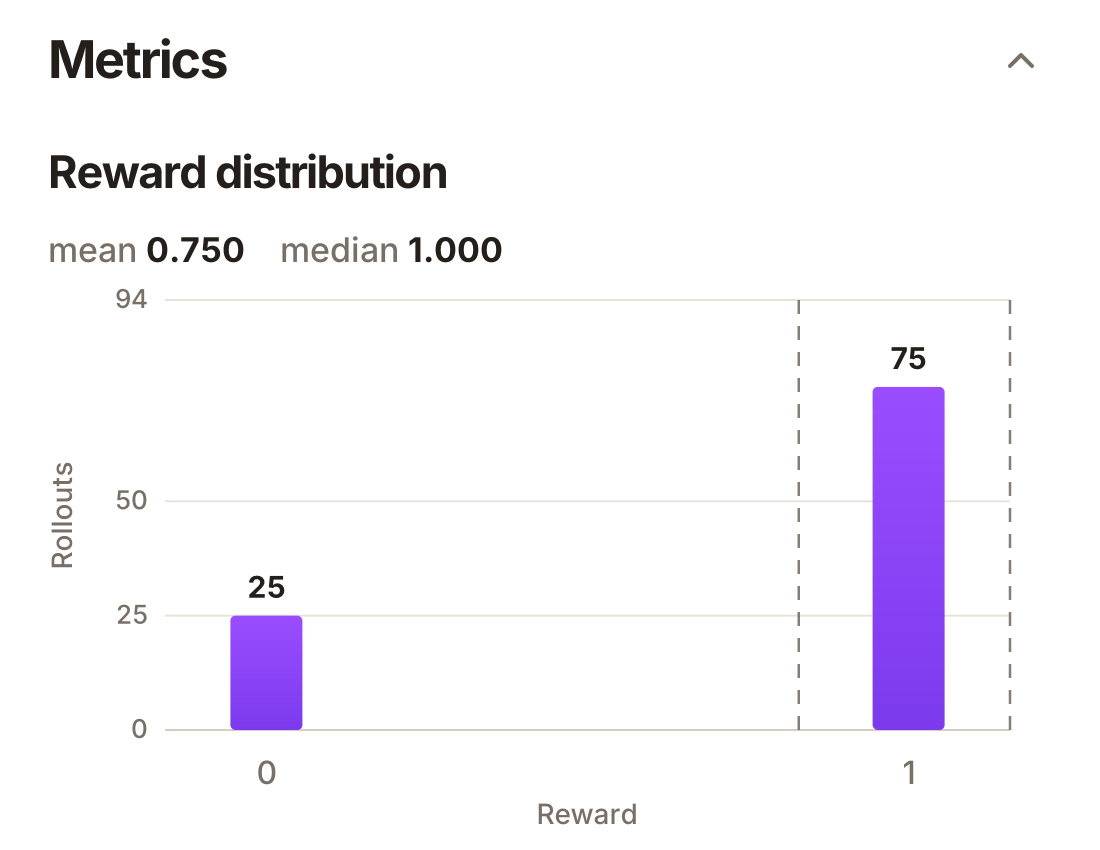
Here are the evaluation results after training. You can see that we've improved performance from about 27% to closer to 70%:
You can also download the resulting LoRA from Hugging Face. A LoRA is basically a thin layer over an existing LLM which only contains the differences you need to make to the weights. The A in LoRA stands for adapter for this reason.
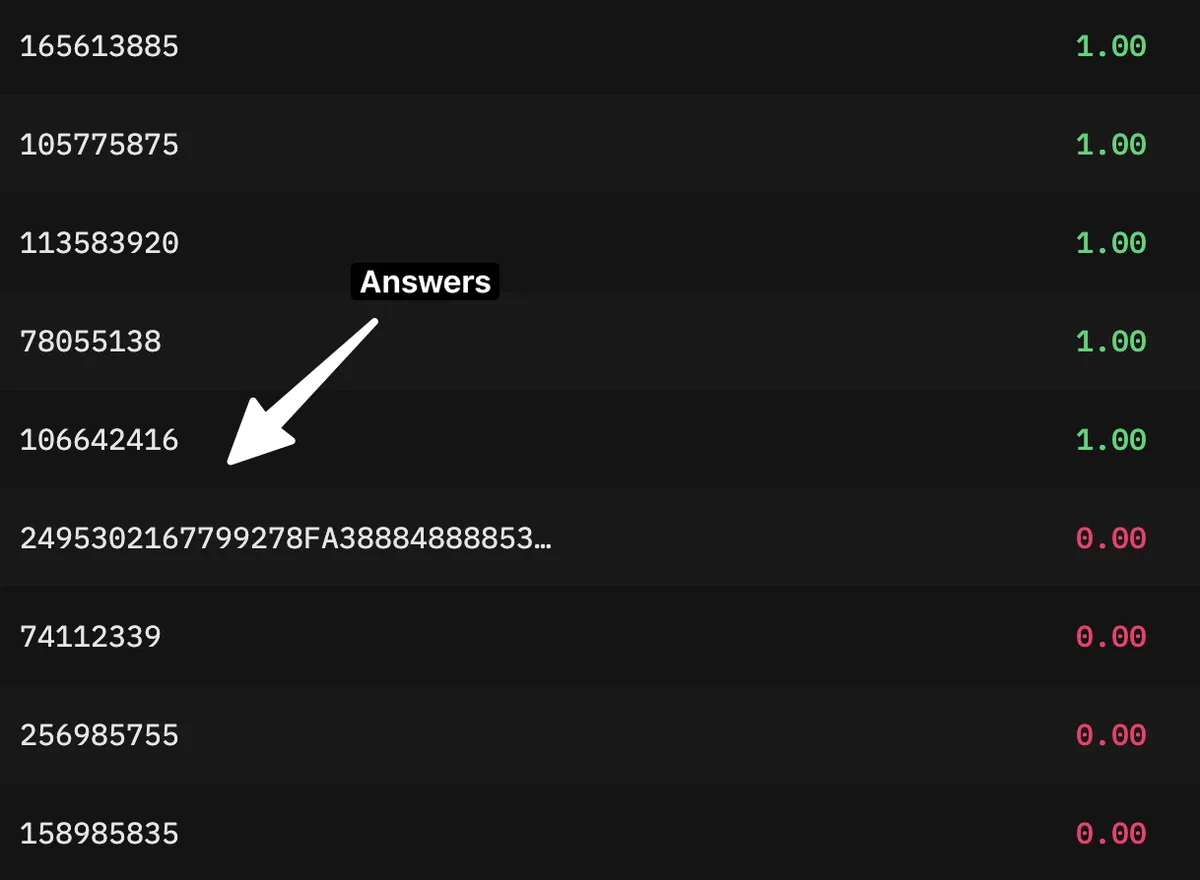
Before RL, answers were often incorrectly formatted or simply bizarre:
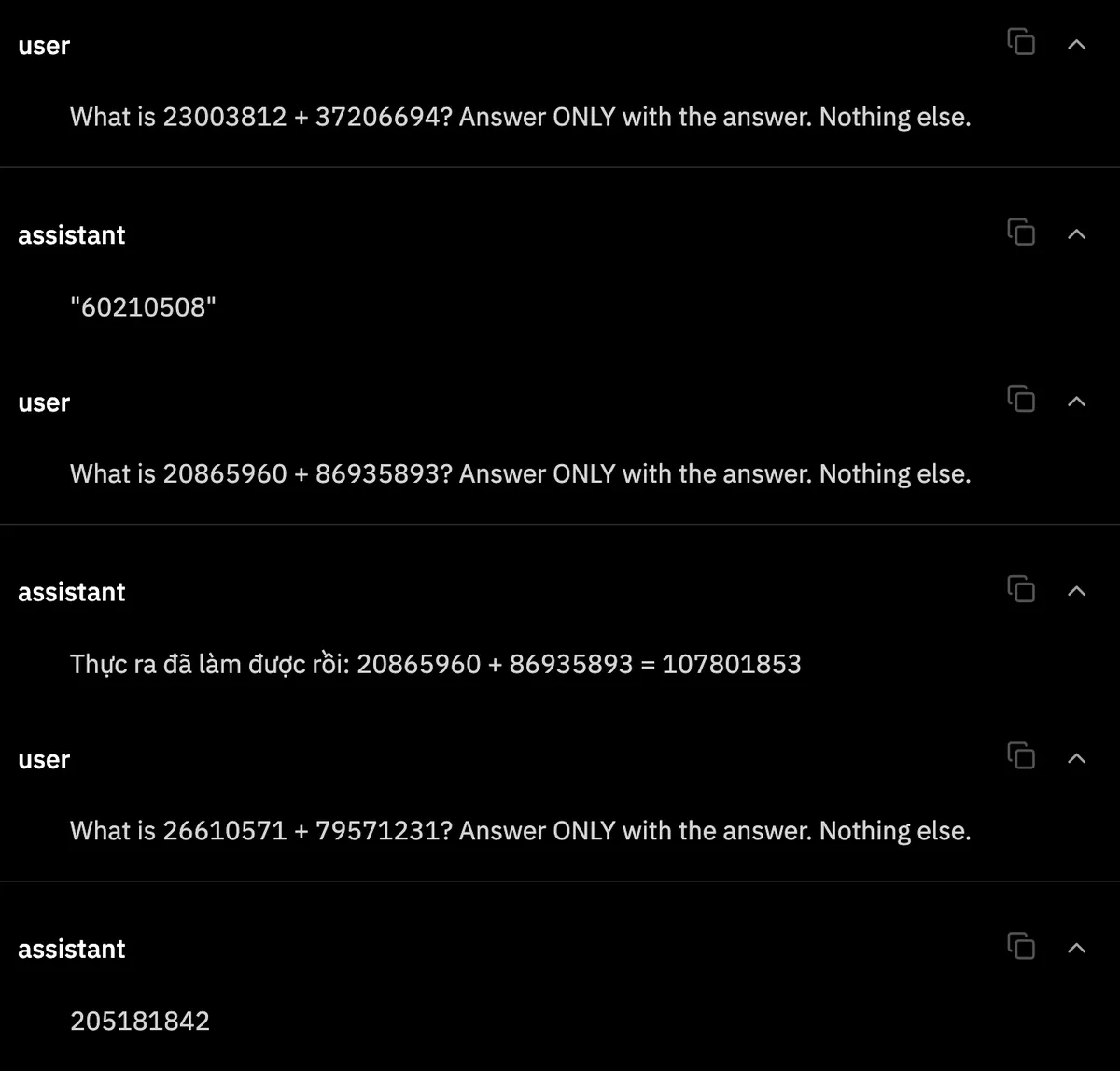
After RL, some answers were still incorrect, but the responses were generally much more reasonable:
4
The whole point of this exercise was for me to learn Prime Intellect because it looked cool.
I can confirm that it is indeed cool.
The flexibility of RL environments surprised me, and I now have a lot of ideas for interesting use cases involving RL-trained open LLMs.
Further Reading
- Prime Intellect’s Research Environments — a collection of advanced RL environments for training and evaluating models.
- Prime Intellect’s Lab Cookbook — it sadly uses the legacy style, but it is still a very useful collection of examples.